


 Performance & SEO
 AI & agentic commerce
 Release tracker
Move to Adobe Commerce without losing data or rankings
Migrations from Magento 1, Shopify and WooCommerce, with every product, customer and order moved and every old URL redirected.
Plan your migrationWhat’s includedFree · No obligation · Reply within one business day
- Products, customers and order history
- Full 301 redirect map
- Search Console checks after launch
Stores we have built and run
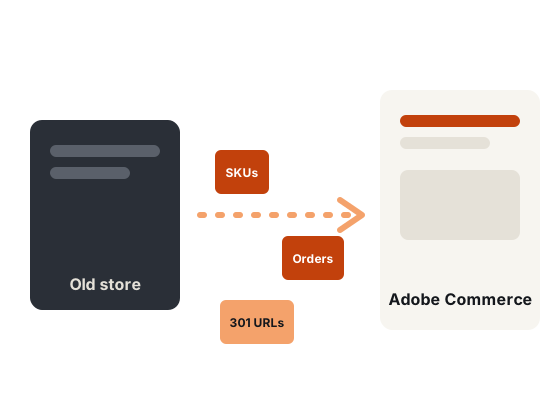
Magento migration moves your products, customers, orders and content from Magento 1, Shopify, WooCommerce or an older Magento 2 store to Adobe Commerce 2.4.9. The two risks are lost data and lost rankings, so every migration is rehearsed on staging and every old URL gets a 301 redirect.
What moves, what changes
Not everything migrates the same way. Knowing which bucket each item is in sets the plan.
 Moves with tools
- Products and categories
- Customers and addresses
- Orders and invoices
- CMS pages and blocks
 Needs mapping
- Attributes and attribute sets
- URLs and redirects
- Tax rules and customer groups
- Media paths
 Rebuilt on 2.4.9
- Theme and templates
- Extensions (2.4.9 versions)
- Custom modules
- Integrations
Why it matters
What a clean move protects
Complete dataProducts, customers, orders and content moved and checked.Rankings protectedEvery old URL redirected with a 301, metadata carried over. Rehearsed launchA full test migration first, then a short final sync.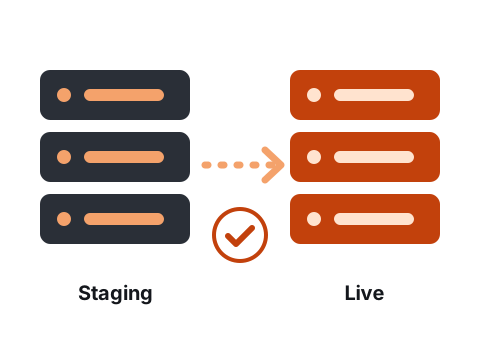
Rehearse, then launch
We run a complete test migration on staging, fix what it reveals, and only then schedule the final sync.
- Data counts checked against the source
- Orders and customers verified
- Short final freeze on launch day
How it works
What’s included

Magento 1 → 2Data, extensions and a new theme.

Shopify → MagentoFor B2B and complex catalogs.

WooCommerce → MagentoWhen the catalog outgrows WordPress.

To Cloud ServiceCustomisations to App Builder and API Mesh.
Redirect mapEvery old URL mapped to its new address.

SEO checksIndexing compared before and after.
Is this right for you?
 A good fit if
- You are on Magento 1 or an unsupported Magento 2 release
- You outgrew Shopify or WooCommerce: B2B, complex pricing or a large catalog
- You are moving to Adobe Commerce as a Cloud Service
- You need to keep years of order history
 Probably not the right fit if
- Your current platform works and only speed is the problem: optimise first
- You cannot freeze catalog changes for a short window on launch day
 What you receive
- Data map and URL redirect map
- A rehearsed test migration on staging
- Launch-day plan with a short final sync
- Search Console checks after launch
Thinking of leaving Magento?
Before you replatform, compare the cost of fixing your current store with the cost of moving. An audit often shows that an upgrade and speed work solve the real problem for less.
How it works
You see the findings, the scope and the price before any code changes.
 AuditWe review code, extensions, hosting and speed.
 Plan & priceA fixed scope and price, or a retainer.
 Build on stagingTested on a copy of your store, never live.
- Launch & supportA planned release, rollback ready, then monitoring.
Stores we have built
Live projects from our portfolio.


For your technical team
How we build it
The stack, standards and handover your developers can expect.
Data- Products, customers, orders and CMS content
- Magento Data Migration Tool for Magento 1
- Record counts checked against the source
SEO- 301 redirect map for every old URL
- Metadata and canonical tags carried over
- Search Console indexing compared after launch
Cutover- Full test migration on staging
- Delta sync of new orders and customers
- Short content freeze on launch day
Related guides
In-depth articles from the Mistri blog.
Questions before you book
Frequently asked questions
Will I lose my Google rankings?
Not if redirects and metadata are handled properly. Every old URL gets a 301 redirect, and we compare indexing in Search Console before and after launch.
Can customer passwords be migrated?
From Magento 1 they usually can. From other platforms, customers are typically asked to set a new password on first login.
How long does a migration take?
It depends on catalog size, integrations and design. We give you a timeline after the audit.
Do you migrate product images and reviews?
Yes, where the source exposes them. We check counts against the source after each run.
Can we keep selling on the old store during the migration?
Yes. The old store stays live while we build and rehearse on staging; only a short content freeze is needed for the final sync.
What happens to our ERP, shipping and payment integrations?
Each one is listed in the audit, then rebuilt or reconnected to Adobe Commerce and tested on staging before launch.
Related services
Upgrades to 2.4.9Safe upgrades from 2.4.6, 2.4.7 and 2.4.8.Learn more → Support & maintenanceSecurity patches, monitoring and fixes every month.Learn more →Magento SEOTechnical SEO fixed in the platform itself.Learn more →
 Our portfolioAdobe Commerce stores and web projects we have built.See the work →
Planning a move?
Tell us where you are moving from and the size of your catalog.
Book a free audit call
Free · No obligation · Reply within one business day